
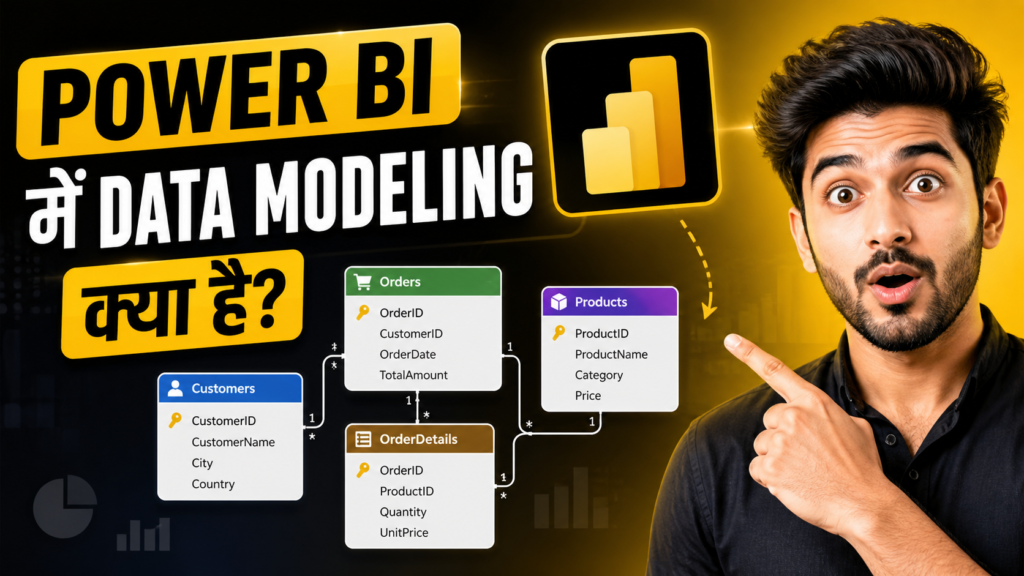
Power BI में Data Modeling क्या है?
अगर आप Power BI सीख रहे हैं, तो यह Power BI का वह Process है जिसमें Data Tables को सही तरीके से Organize किया जाता है।
Power BI में Data Modeling क्या है? पूरी जानकारी हिंदी में 2026
इन Tables के बीच Relationships बनाई जाती हैं ताकि Data सही तरह से Connect हो सके।
कई Beginners सीधे Charts और Dashboards बनाना शुरू कर देते हैं।
लेकिन सही Data Modeling के बिना Reports में Errors आ सकते हैं।
Wrong Calculations, Duplicate Values और slow performance जैसी समस्याएँ भी होती हैं।
एक मजबूत Data Model आपके Dashboard को fast, accurate और professional बनाता है।
यही वजह है कि बेहतर Reporting और Analysis की शुरुआत हमेशा Data Modeling से होती है।
Data Modeling क्या है?
Data Modeling एक Process है जिसमें Data को सही तरीके से Organize किया जाता है।
इसमें अलग-अलग Tables को Arrange और Connect किया जाता है।
Power BI में Data Modeling का मतलब है Data को Analysis के लिए तैयार करना।
इसमें Tables के बीच Relationships बनाई जाती हैं। Calculations define की जाती हैं। Data Structure को optimize किया जाता है।
इससे Data Analysis आसान और Accurate बनता है।
इसे ऐसे समझें।
अगर Data एक शहर है, तो Data Modeling उसका map है। यह सभी रास्तों और Connections को व्यवस्थित रखता है।
Power BI में Data Modeling क्यों जरूरी है?
Accurate Analysis
Data Modeling सही Relationships बनाकर Calculations को Accurate बनाता है।
अगर Tables सही तरीके से connected नहीं हों, तो Analysis के Results गलत आ सकते हैं।
Faster Performance
एक Optimized Data Model Reports और Dashboards की Speed को बेहतर बनाता है।
इससे Data जल्दी Load होता है और Report Smoothly काम करती है।
Easy Reporting
जब Data Model सही बना होता है, तो Dashboards और Visual Reports बनाना आसान हो जाता है। इससे Report Creation में कम समय लगता है।
Better Scalability
अच्छा Data Model large datasets पर भी Efficiently काम करता है।
जैसे-जैसे Data बढ़ता है, Performance Stable रहती है।
-
Tables
Power BI में Data अलग-अलग Tables के रूप में आता है। हर table किसी specific information को store करती है।
जैसे Sales Table में sales data होता है, Product Table में product details और Customer Table में customer information होती है।
यही tables मिलकर पूरे data model की foundation बनाती हैं।
-
Relationships
Relationships अलग-अलग tables को आपस में connect करते हैं। इनके जरिए Power BI समझता है कि कौन-सा data किस table से जुड़ा हुआ है।
सही Relationships Analysis को accurate बनाते हैं।
मुख्य प्रकार के Relationships:
- One-to-One (1:1): एक row दूसरी table की सिर्फ एक row से जुड़ती है।
- One-to-Many (1:*): सबसे common relationship। एक record कई records से जुड़ सकता है।
- Many-to-One (*:1): One-to-Many का reverse होता है।
- Many-to-Many (*:*): जब दोनों tables में duplicate values होती हैं।
-
Cardinality
Cardinality यह बताती है कि दो tables के बीच relationship किस प्रकार का है।
यह तय करती है कि data कैसे connect होगा। सही cardinality report की accuracy के लिए बहुत जरूरी है।
-
Cross Filter Direction
Cross Filter Direction यह तय करता है कि filter एक table से दूसरी table तक किस दिशा में जाएगा। यह report interaction को control करता है।
इसके दो प्रकार होते हैं:
- Single: Filter केवल एक दिशा में काम करता है।
- Both: Filter दोनों दिशाओं में काम करता है।
Beginners को इस concept में अक्सर confusion होती है क्योंकि गलत setting analysis को प्रभावित कर सकती है।
-
Measures
Measures Dynamic Calculations होती हैं जो Report के अनुसार बदलती रहती हैं।
ये Real-Time Calculation करती हैं और Analysis को Flexible बनाती हैं।
उदाहरण:
Total Sales = SUM(Sales[Amount])
यह measure total sales value calculate करता है।
-
Calculated Columns
Calculated Columns table के अंदर नई column create करती हैं।
इनकी values row-by-row calculate होती हैं और permanently model में store रहती हैं।
उदाहरण:
Profit = Sales[Revenue] – Sales[Cost]
यह column हर sales record का profit calculate करती है।
Star Schema क्या है?
Power BI Data Modeling में सबसे Recommended Structure Star Schema होता है।
यह Data को Organized और Efficient तरीके से manage करने का best तरीका माना जाता है।
इसमें एक Central Fact Table होती है, जो Numeric Data Store करती है।
इस table में मुख्य Business Values होती हैं, जैसे Sales, Revenue और Quantity।
Fact Table:
Fact Table analysis और calculations के लिए उपयोग की जाती है, क्योंकि यही actual transactional data को store करती है।
Dimension Tables:
Dimension Tables descriptive information store करती हैं।
इनमें वह Details होती हैं जो Data को समझने और Analyze करने में मदद करती हैं।
उदाहरण के लिए Products table product की जानकारी रखती है, Customers table customer details store करती है, और Date table समय से जुड़ी जानकारी देती है।
ये tables Fact Table को context प्रदान करती हैं, जिससे data analysis अधिक meaningful और detailed बनता है।
Star Schema Example
-
Fact_Sales
यह मुख्य Fact Table होती है, जिसमें Transactional Data store होता है।
इसमें ProductID, CustomerID, DateID और SalesAmount जैसे fields होते हैं।
यह Table Analysis और Calculations का मुख्य source होती है।
-
Dim_Product
यह Dimension Table Product से जुड़ी descriptive information store करती है।
इसमें ProductID और ProductName जैसे details होते हैं, जिनकी मदद से product-wise analysis किया जाता है।
-
Dim_Customer
यह table customer की जानकारी store करती है।
इसमें CustomerID और CustomerName जैसे fields होते हैं, जो customer-based reporting और analysis को आसान बनाते हैं।
-
Dim_Date
यह table date-related details store करती है।
इसमें DateID, Month और Year जैसे fields होते हैं। इसकी मदद से monthly, quarterly और yearly analysis किया जाता है।
Structure का फायदा
यह Star Schema structure Power BI की performance को बेहतर बनाता है। साथ ही data analysis को faster, accurate और आसान बनाता है।
Snowflake Schema क्या है?
Snowflake Schema, Star Schema का advanced और extended version होता है।
इसमें Data को और ज्यादा structured तरीके से organize किया जाता है ताकि duplication कम हो सके।
यह कैसे काम करता है?
इस schema में Dimension Tables को further divide और normalize किया जाता है।
यानी एक बड़ी dimension table को छोटे-छोटे related tables में बाँट दिया जाता है।
– उदाहरण
मान लीजिए Product Table है। इसमें product details रखने के बजाय category की जानकारी अलग Category Table में store की जा सकती है।
फिर Product Table उस Category Table से connected रहती है।
Performance
Snowflake Schema में extra relationships होने की वजह से queries को ज्यादा joins करने पड़ते हैं।
इसी कारण इसकी performance Star Schema की तुलना में थोड़ी slow हो सकती है।
Complexity
यह schema समझने और manage करने में थोड़ा complex होता है। Beginners के लिए इसे handle करना मुश्किल हो सकता है।
Star Schema vs Snowflake स्कीमा
Star Schema simple और fast होता है, इसलिए इसे ज्यादा prefer किया जाता है।
वहीं Snowflake Schema ज्यादा organized होता है, लेकिन इसकी complexity भी ज्यादा होती है।
Power BI में कौन बेहतर है?
Power BI में आमतौर पर Star Schema बेहतर माना जाता है क्योंकि यह faster performance देता है और reports बनाना भी आसान बनाता है।
Snowflake Schema केवल खास situations में इस्तेमाल किया जाता है।
Power BI में Data Modeling कैसे करें?
Step 1: Data Import करें
Data Modeling की शुरुआत data import करने से होती है।
Power BI में आप अलग-अलग sources जैसे Excel, SQL Server, CSV files, Web sources और APIs से data load कर सकते हैं।
सही data source चुनना analysis की quality के लिए बहुत important होता है।
Step 2: Power Query में Data Clean करें
Data import करने के बाद उसे clean और prepare करना जरूरी होता है।
इसमें Duplicate records हटाना, null values को handle करना, columns को सही नाम देना और data types बदलना शामिल है।
Clean data हमेशा बेहतर analysis देता है।
Step 3: Model View खोलें
Power BI Desktop में Left Sidebar → Model View पर जाएं।
यहाँ आपको सभी imported tables दिखाई देंगी।
यही वह जगह है जहाँ आप tables के बीच relationships manage करते हैं और पूरे data model को visualize कर सकते हैं।
Step 4: Relationships Create करें
अब Tables को drag and drop करके connect करें।
Relationship बनाते समय सही Key Column चुनना बहुत जरूरी है।
साथ ही सही Cardinality और filter direction select करें, ताकि analysis accurate रहे।
Step 5: Measures Create करें
Measures analysis के लिए dynamic calculations provide करते हैं। ये report के filters और context के अनुसार automatically calculate होते हैं।
उदाहरण:
Total Profit
Total Profit = SUM(Sales[Profit])
यह total profit calculate करता है।
Profit Margin
Profit Margin = DIVIDE([Total Profit], [Total Sales])
यह profit percentage निकालता है।
Step 6: Model Optimize करें
अंत में Data Model को optimize करें।
इसके लिए unused columns हटाएं, unnecessary tables remove करें और data structure को simple रखें।
इससे Report की Performance बेहतर होती है और dashboards तेजी से load होते हैं।
Best Practices for Data Modeling in Power BI
-
Use Star Schema
Power BI में हमेशा कोशिश करें कि आप Star Schema का उपयोग करें।
यह सबसे efficient और widely recommended data modeling structure है।
इसमें एक central Fact Table होती है और उसके आसपास Dimension Tables होती हैं।
यह structure reports को fast बनाता है, relationships को आसान रखता है और analysis को ज्यादा accurate बनाता है।
खासकर Beginners के लिए यह समझना और manage करना आसान होता है।
-
Avoid Many-to-Many Relationships
जहाँ तक संभव हो, Many-to-Many relationships से बचना चाहिए।
यह Relationship Model को complex बना सकती है और कई बार गलत calculations या unexpected results दे सकती है।
जब दोनों Tables में duplicate values होती हैं, तो Power BI data को सही तरीके से interpret करने में confusion पैदा कर सकता है।
इसलिए बेहतर है कि One-to-Many relationship structure अपनाया जाए।
-
Use Proper Naming Convention
Tables, columns और measures के लिए हमेशा clear और meaningful names रखें।
सही naming convention model को समझने और manage करने में बहुत मदद करती है।
गलत उदाहरण: Table1
सही उदाहरण: Fact_Sales
जब Names Descriptive होते हैं, तो किसी भी developer या analyst को model जल्दी समझ आता है। इससे collaboration भी आसान हो जाती है।
-
Remove Unnecessary Columns
Model में केवल वही columns रखें जिनकी वास्तव में जरूरत हो।
Extra और unused columns model का size बढ़ाते हैं, जिससे report performance slow हो सकती है।
एक simple rule याद रखें:
कम columns = बेहतर performance
Unused columns हटाने से memory usage कम होती है और dashboards तेजी से load होते हैं।
-
Create Date Table
Power BI में एक dedicated Date Table बनाना बहुत जरूरी है।
यह time-based analysis और advanced calculations के लिए foundation का काम करती है।
Date Table की मदद से आप आसानी से calculations कर सकते हैं जैसे:
- YTD (Year to Date)
- MTD (Month to Date)
- YoY (Year over Year)
अगर Date Table सही तरीके से setup हो, तो time intelligence functions बहुत smoothly काम करते हैं।
-
Hide Technical Columns
कई columns सिर्फ relationships या backend calculations के लिए होती हैं, जैसे IDs और keys। इन्हें report users को दिखाने की जरूरत नहीं होती।
उदाहरण के लिए:
- ProductID
- CustomerID
- DateID
ऐसे Technical Columns को Hide कर देना चाहिए ताकि Users को सिर्फ meaningful fields दिखाई दें। इससे report interface clean, professional और user-friendly बनता है।
मान लीजिए आपके पास एक E-commerce company का data है। आप जानना चाहते हैं कि कौन-सा product सबसे ज्यादा बिक रहा है।
किस शहर से सबसे ज्यादा sales आ रही हैं। और Monthly Revenue का trend कैसा है।
इसके लिए Data का सही तरीके से modeled होना बहुत जरूरी है।
अगर tables सही connected हैं, जैसे Sales → Product → Customer → Date, तो Analysis आसान हो जाता है।
- आप जल्दी से product-wise sales देख सकते हैं।
- City-wise performance analyze कर सकते हैं।
- Monthly revenue trend track कर सकते हैं।
लेकिन अगर Relationships गलत हों, तो results गलत दिख सकते हैं। Dashboard inaccurate data दिखाएगा। और decision लेना मुश्किल हो जाएगा।
यही कारण है कि सही Data Modeling Power BI analysis की foundation है।
Common Mistakes Beginners करते हैं
Flat Table Use करना
कई beginners पूरा data एक ही table में रखने की कोशिश करते हैं। यह शुरुआत में आसान लगता है, लेकिन बड़े datasets पर यह inefficient हो जाता है। इससे model complex होता है और performance भी slow हो सकती है।
Wrong Relationships बनाना
गलत tables को connect करना या गलत keys चुनना एक common mistake है। इससे calculations गलत हो सकती हैं और dashboard inaccurate results दिखा सकता है।
Duplicate Keys रखना
जब Relationship columns में duplicate values होती हैं, तो relationship errors आ सकते हैं।
इससे data model सही तरीके से काम नहीं करता और analysis प्रभावित होता है।
Too Many Calculated Columns बनाना
बहुत ज्यादा calculated columns बनाने से model का size बढ़ जाता है।
इसका सीधा असर performance पर पड़ता है और reports slow हो सकती हैं। Measures का इस्तेमाल कई बार बेहतर option होता है।
Data Modeling के फायदे
अच्छी Data Modeling से Performance काफी बेहतर हो जाती है।
Reports और Dashboards तेजी से load होते हैं, जिससे काम करने का अनुभव smooth बनता है।
इसके साथ ही Accuracy भी बढ़ती है, क्योंकि सही Relationships और Structured data reliable calculations देते हैं।
एक well-designed data model Maintenance को आसान बनाता है।
अगर future में कोई बदलाव करना हो या नया data source जोड़ना हो, तो उसे manage करना सरल हो जाता है।
सबसे बड़ा फायदा यह है कि ऐसे Models scalable होते हैं। यानी dataset बड़ा होने पर भी reports smoothly काम करती हैं और performance पर ज्यादा असर नहीं पड़ता।
हालांकि इसके कुछ Challenges भी हैं।
शुरुआती लोगों के लिए इसे समझना थोड़ा complex लग सकता है।
अगर Relationships गलत बना दी जाएं, तो analysis में confusion और गलत results आ सकते हैं।
इसके अलावा, एक अच्छा data model बनाने के लिए पहले से proper planning और सही structure तय करना जरूरी होता है।
FAQs
- Power BI में Data Modeling क्यों जरूरी है?
यह accurate analysis, fast performance और बेहतर dashboard बनाने के लिए जरूरी है।
- Star Schema क्या होता है?
यह data organization का structure है जिसमें एक Fact Table कई Dimension Tables से जुड़ी होती है।
- क्या बिना Data Modeling के Power BI इस्तेमाल कर सकते हैं?
हाँ, लेकिन reports inaccurate और slow हो सकती हैं।
- Beginners के लिए कौन सा schema best है?
Star Schema
- Data Modeling सीखने में कितना समय लगता है?
अगर रोज practice करें तो 2–3 हफ्तों में basics अच्छे से समझ आ जाते हैं।
Power BI सीरीज:-
- Power BI क्या है? Introduction & Basic जानकारी हिंदी में
- Power BI Installation & Interface हिंदी में 2026
- Power BI Data Import & Sources Guide Hindi 2026
- Power BI के Power Query Editor में Data Cleaning कैसे करें?
Power BI में Data Modeling केवल एक technical process नहीं, बल्कि strong और effective reporting की foundation है।
अगर आप चाहते हैं कि आपकी reports fast चलें, accurate insights दें और professional दिखाई दें, तो Data Modeling सीखना बेहद जरूरी है।
इसे जरूर पढ़े: Samsung Browser for PC: Agentic AI के साथ Smart Browsing का नया दौर
शुरुआत में यह थोड़ा challenging लग सकता है, लेकिन जैसे-जैसे आप relationships, schema और measures को समझते जाते हैं, Power BI काफी आसान और powerful लगने लगता है।
अगर आपका लक्ष्य Power BI में mastery हासिल करना है, तो Data Modeling को कभी नजरअंदाज न करें।
यही वह skill है जो एक Beginner को Professional Analyst बनने की दिशा में आगे बढ़ाती है।